> ## Documentation Index
> Fetch the complete documentation index at: https://docs.tabby.ai/llms.txt
> Use this file to discover all available pages before exploring further.

# Checkout Flow

Tabby's Buy Now, Pay Later solution allows your customers to split the purchase price into several payments with the downpayment and monthly repayments.

<Steps>
  <Step
    stepNumber={1}
    title={(
  <span>
    <span style={{ fontWeight: 'normal' }}>
      Enable&nbsp;
    </span>
    <a href="/pay-in-4-custom-integration/checkout-flow#background-pre-scoring-check">
      Background Pre-scoring
    </a>
  </span>
)}
  />

  <Step
    stepNumber={2}
    title={(
  <span>
    <span style={{ fontWeight: 'normal' }}>
      Create&nbsp;
    </span>
    <a href="/pay-in-4-custom-integration/checkout-flow#checkout-session-initiation">
      Checkout Session
    </a>
    <span style={{ fontWeight: 'normal' }}>
      &nbsp;and redirect a customer to the Tabby Payment Page
    </span>
  </span>
)}
  />

  <Step
    stepNumber={3}
    title={(
  <span>
    <span style={{ fontWeight: 'normal' }}>
      Redirect the customer&nbsp;
    </span>
    <a href="/pay-in-4-custom-integration/checkout-flow#redirection-to-the-store">
      back to your store
    </a>
  </span>
)}
  />
</Steps>

## Tabby on Checkout

Use the standard Tabby naming and Logo to present Tabby method at your checkout:

|                         | English              | Arabic              |
| ----------------------- | -------------------- | ------------------- |
| **Payment Method Name** | Pay later with Tabby | ادفع لاحقًا مع تابي |

### Recommended: Checkout Snippet

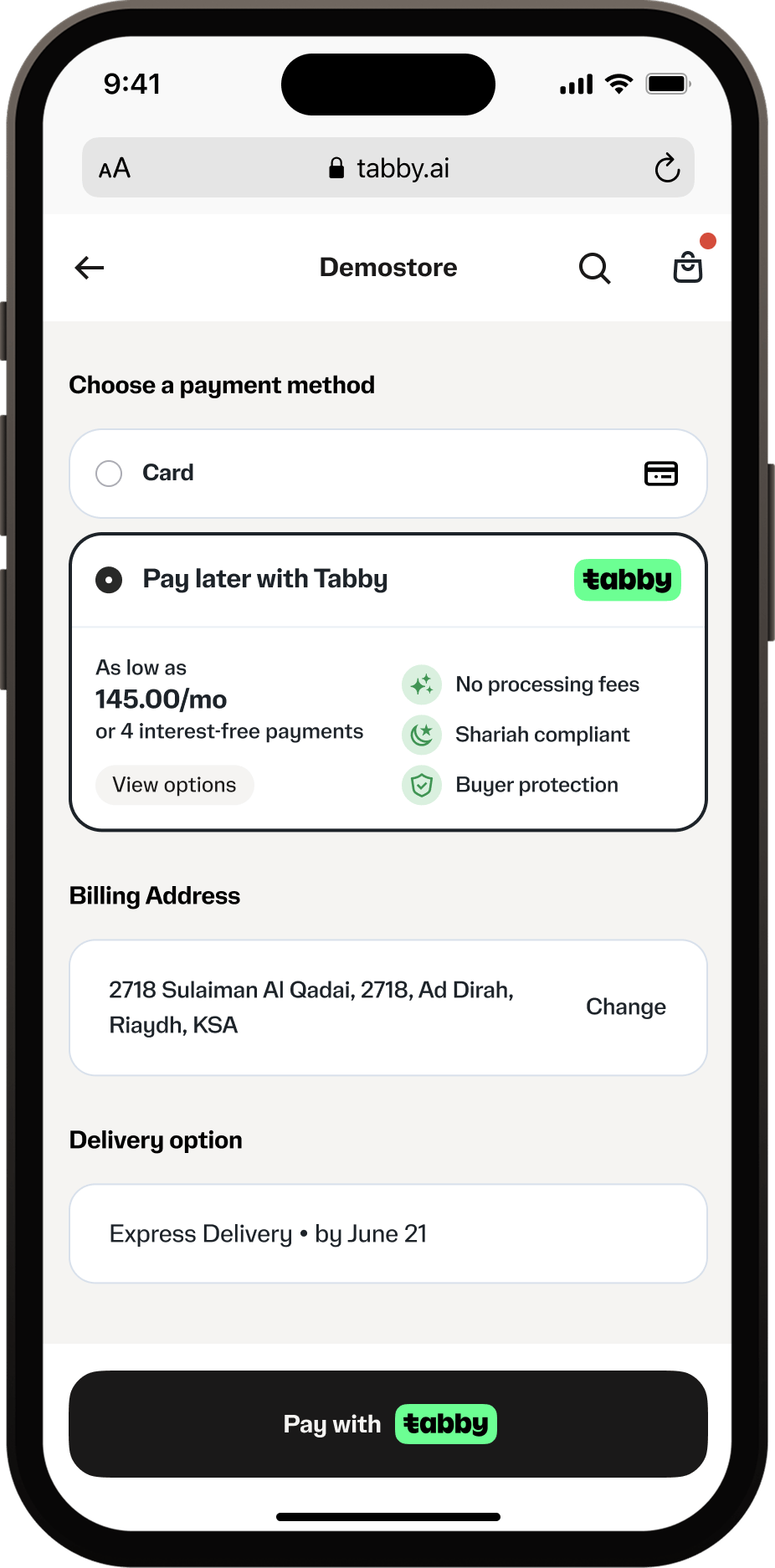
Display the <a href="/pay-in-4-custom-integration/on-site-messaging#checkout-snippet">Checkout snippet</a> under the Tabby payment method when it is selected. The snippet shows the actual cost breakdown for the order amount and the key benefits, and keeps this information always up to date:

<img className="product-shot" alt="Tabby payment method with the Checkout snippet" src="https://mintcdn.com/tabby-5f40add6/iK1YsG45ORNrhJBb/images/checkout-snippet-0626.png?fit=max&auto=format&n=iK1YsG45ORNrhJBb&q=85&s=07d7ea5f1fefcb041986993eecdb8f78" width="320" data-path="images/checkout-snippet-0626.png" />

### Alternative: Payment Method Description

If the Checkout snippet cannot be embedded (e.g., due to checkout platform constraints), add a static description under the payment method name showing the cost breakdown:

|                                | English                                               | Arabic                                                  |
| ------------------------------ | ----------------------------------------------------- | ------------------------------------------------------- |
| **Payment Method Description** | 4 payments of XX.XX/mo or up to 12 months. Learn more | 4 دفعات بقيمة XX.XX شهريًا أو حتى 12 شهرًا. اعرف المزيد |

* **XX.XX** is the monthly payment amount with your store currency: order total × 1.015 / 4 (3 decimal places for KWD)
* **Learn more** should open the Tabby <a href="/pay-in-4-custom-integration/on-site-messaging#custom-promo-snippets">pop-up</a> with the payment schedule

## Background Pre-scoring Check

Background pre-scoring (also known as eligibility check) determines whether a customer is eligible to use Tabby before displaying it as a payment option. This check takes place at your checkout when the total amount and customer contact details are known.

<Note>
  For detailed implementation including when to perform checks, error handling, caching strategies, rejection messages, and complete code examples, see: <a href="/introduction/faq#when-should-i-perform-eligibility-check%3F">FAQ - Eligibility Check Best Practices</a>
</Note>

### Quick Implementation

Call `POST /api/v2/checkout` endpoint with minimal required data (but more is better): **amount**, **currency**, **buyer.email**, **buyer.phone**, and **merchant\_code**.

<Note>
  Use the base URL for your region: `api.tabby.ai` (UAE, Kuwait) or `api.tabby.sa` (KSA). See <a href="/api-reference/overview#base-urls">Base URLs</a>.
</Note>

Providing additional details like **order.items**, **shipping\_address**, and customer information - **buyer\_history**, **order\_history**, etc. - helps improve scoring accuracy and increases approval rates.

### Response handling

Check the `status` field to determine eligibility:

* `status: "created"` → customer is eligible, show Tabby;
* `status: "rejected"` → customer is not eligible, hide Tabby or show rejection message.

You can extract the rejection reason from: `configuration.products.installments.rejection_reason`

### Possible rejection\_reason values

Here are possible `"rejection_reason"` values and corresponding messages to show to customers:

| Reason                              | English                                                                                                                    | Arabic                                                                                                      |
| ----------------------------------- | -------------------------------------------------------------------------------------------------------------------------- | ----------------------------------------------------------------------------------------------------------- |
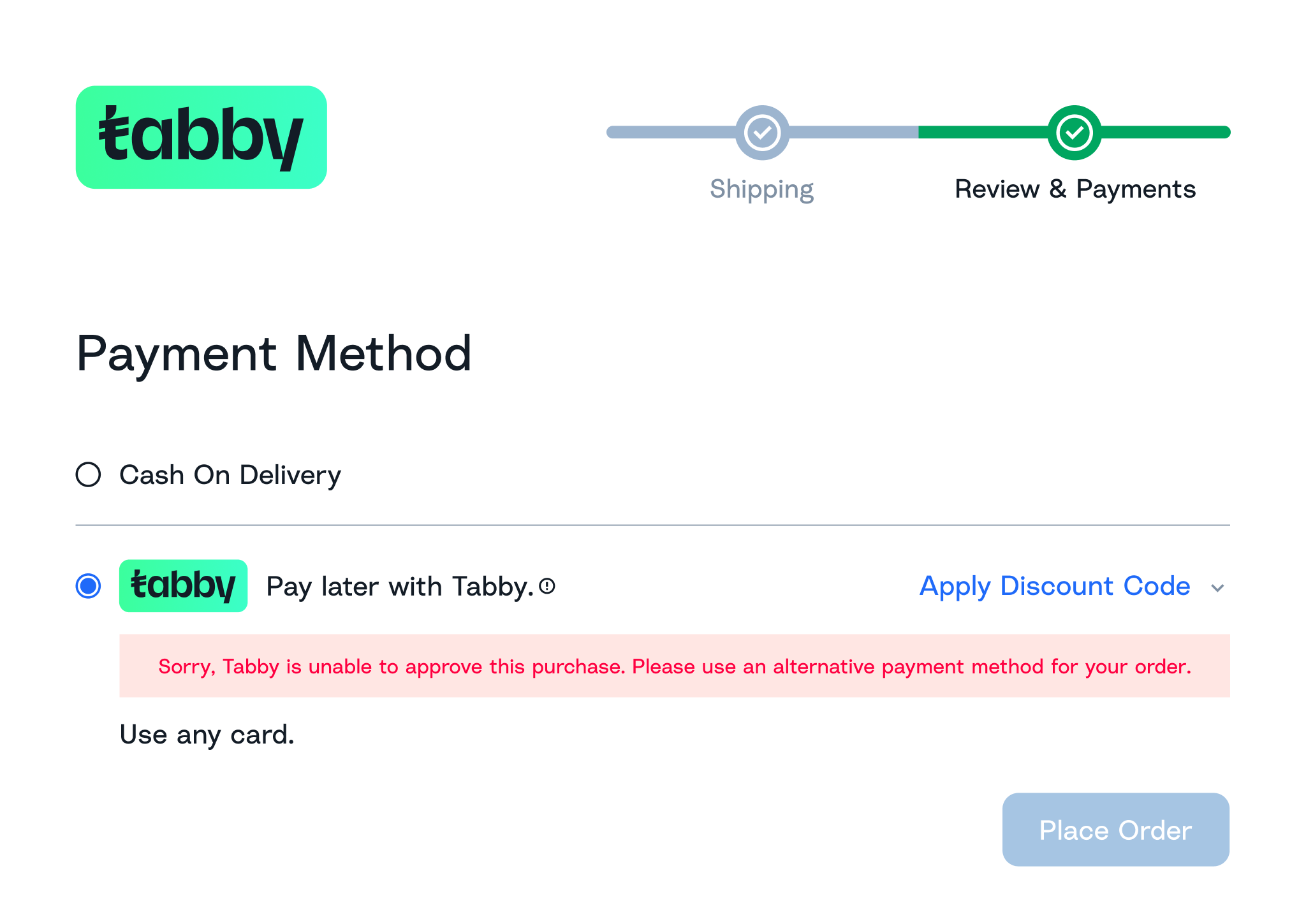
| General Rejection (`not_available`) | Sorry, Tabby is unable to approve this purchase. Please use an alternative payment method for your order.                  | نأسف، تابي غير قادرة على الموافقة على هذه العملية. الرجاء استخدام طريقة دفع أخرى.                           |
| `order_amount_too_high`             | This purchase is above your current spending limit with Tabby, try a smaller cart or use another payment method            | قيمة الطلب تفوق الحد الأقصى المسموح به حاليًا مع تابي. يُرجى تخفيض قيمة السلة أو استخدام وسيلة دفع أخرى.    |
| `order_amount_too_low`              | The purchase amount is below the minimum amount required to use Tabby, try adding more items or use another payment method | قيمة الطلب أقل من الحد الأدنى المطلوب لاستخدام خدمة تابي. يُرجى زيادة قيمة الطلب أو استخدام وسيلة دفع أخرى. |

### Best Practices

**Key principles**:

* **Fail-safe approach** - always default to showing Tabby on API errors or timeouts
* **Loading states** - show appropriate UI feedback during checks
* **Background checks** - perform eligibility checks when customer enters checkout or cart amount changes
* **Rejection handling** - hide Tabby (recommended) or show rejection message.

<div className="product-shot-figure">
  <img className="product-shot" alt="Background pre-scoring rejection message" src="https://mintcdn.com/tabby-5f40add6/Mdf68_F2fROQ9Weu/images/pre-scoring-upd-0725.png?fit=max&auto=format&n=Mdf68_F2fROQ9Weu&q=85&s=be374494af83fe2e4a1b347e013f0898" width="2048" height="1449" data-path="images/pre-scoring-upd-0725.png" />

  <p className="product-shot-caption">Show rejection message for ineligible customers</p>
</div>

### Eligibility Check vs Session Creation

Tabby's Checkout API serves two distinct purposes. Here's a side by side comparison:

| Aspect        | Eligibility Check                                                          | Checkout Session Creation                                    |
| ------------- | -------------------------------------------------------------------------- | ------------------------------------------------------------ |
| **Purpose**   | Determine if customer can use Tabby                                        | Create payment session for actual checkout                   |
| **Timing**    | Before showing Tabby payment method                                        | When customer clicks "Place order"                           |
| **Payload**   | Minimal (amount, currency, buyer)                                          | Complete (all order details, items, shipping, merchant URLs) |
| **Response**  | Status (`created` or `rejected`) + rejection reason                        | Status + `web_url` for redirect + `payment.id`               |
| **Next Step** | Show or hide / mark unavailable Tabby payment method based on the response | Redirect to Tabby Hosted Payment Page                        |

## Checkout Session Initiation

When the customer who passed eligibility check clicks "Place order" with Tabby selected, call <a href="/api-reference/checkout/create-a-session">Checkout API</a> with the **full payload** including all order details, items, shipping address, and merchant URLs.

**This is different from the eligibility check** - you must now provide complete order information.

### Example of a minimal payload for eligibility check

```json theme={"dark"}
{
  "payment": {
    "amount": "340.00",
    "currency": "SAR",
    "buyer": {
      "email": "otp.success@tabby.ai",
      "phone": "+966500000001"
    }
  },
  "merchant_code": "your_merchant_code"
}
```

**Key principle**: Use the same endpoint (`POST /api/v2/checkout`) but with different payload sizes for different purposes.

### Response and Validation

In a successful response you will receive `status`, `web_url`, and `payment.id`:

<Warning>
  **Always validate that `web_url` is present** in the response before redirecting. If `web_url` is missing or `status` is "rejected", show the rejection message instead of redirecting.
</Warning>

This validation handles edge cases where:

* Cart amount or customer details changed between eligibility check and session creation;
* Customer was blacklisted between checks;
* Eligibility check timed out (fail-safe showed Tabby as available).

<Warning>
  Save <code style={{ fontWeight: 'bold' }}>"payment"."id"</code> **from the response** - it will be used to verify, capture and refund the payment on the next steps.
</Warning>

### At Tabby Hosted Payment Page

At Tabby Checkout your customers will be asked:

* To verify the phone number by OTP (each transaction);
* To link Apple Pay or regular card (only for new Tabby customers);
* Additional data may be asked during customer's flow for some customers.

## Redirection to the Store

When customers finish Tabby session, they are redirected to one of three URLs you provide in the session creation request, with `payment_id` appended as a query parameter:

| Redirect URL | Use Case                                 | Payment Status           | Next Steps                                                                                                                                   |
| ------------ | ---------------------------------------- | ------------------------ | -------------------------------------------------------------------------------------------------------------------------------------------- |
| `success`    | Customer completed payment verification  | `AUTHORIZED` or `CLOSED` | Show "Thank you" page, verify status on backend, proceed to <a href="/pay-in-4-custom-integration/payment-processing">Payment Processing</a> |
| `cancel`     | Customer cancelled the payment willingly | `EXPIRED`                | Return to checkout or cart, allow retry                                                                                                      |
| `failure`    | Payment was rejected by Tabby            | `REJECTED`               | Show rejection message, offer alternative payment methods                                                                                    |

### Handling redirects

* Redirect the customer immediately to avoid delays - do not block with payment status checks
* The redirect is a frontend navigation signal only. Verify payment status asynchronously on your backend via webhooks or `getPayment` API
* Show "Confirming payment..." on Thank you page if status is pending, update once backend confirms final status

<Warning>
  Always verify payment status via your backend. Never rely on redirect URLs or query parameters alone as the source of truth.
</Warning>

### Approved messages for redirects

The following messages can be used to show to customers after a redirect:

| Reason         | English message                                                                                          | Arabic message                                                                    |
| -------------- | -------------------------------------------------------------------------------------------------------- | --------------------------------------------------------------------------------- |
| `Cancellation` | You aborted the payment. Please retry or choose another payment method.                                  | لقد ألغيت الدفعة. فضلاً حاول مجددًا أو اختر طريقة دفع أخرى.                       |
| `Failure`      | Sorry, Tabby is unable to approve this purchase. Please use an alternative payment method for your order | نأسف، تابي غير قادرة على الموافقة على هذه العملية. الرجاء استخدام طريقة دفع أخرى. |

### Allowed characters in redirect URLs ("success", "cancel", "failure")

1. Latin letters (a-z, A-Z)
2. Arabic letters (ء-ي)
3. Digits (0-9)
4. Special characters - \ | / : ;., + \{}? & @ = # %