> ## Documentation Index
> Fetch the complete documentation index at: https://docs.tabby.ai/llms.txt
> Use this file to discover all available pages before exploring further.

# On‑Site Messaging

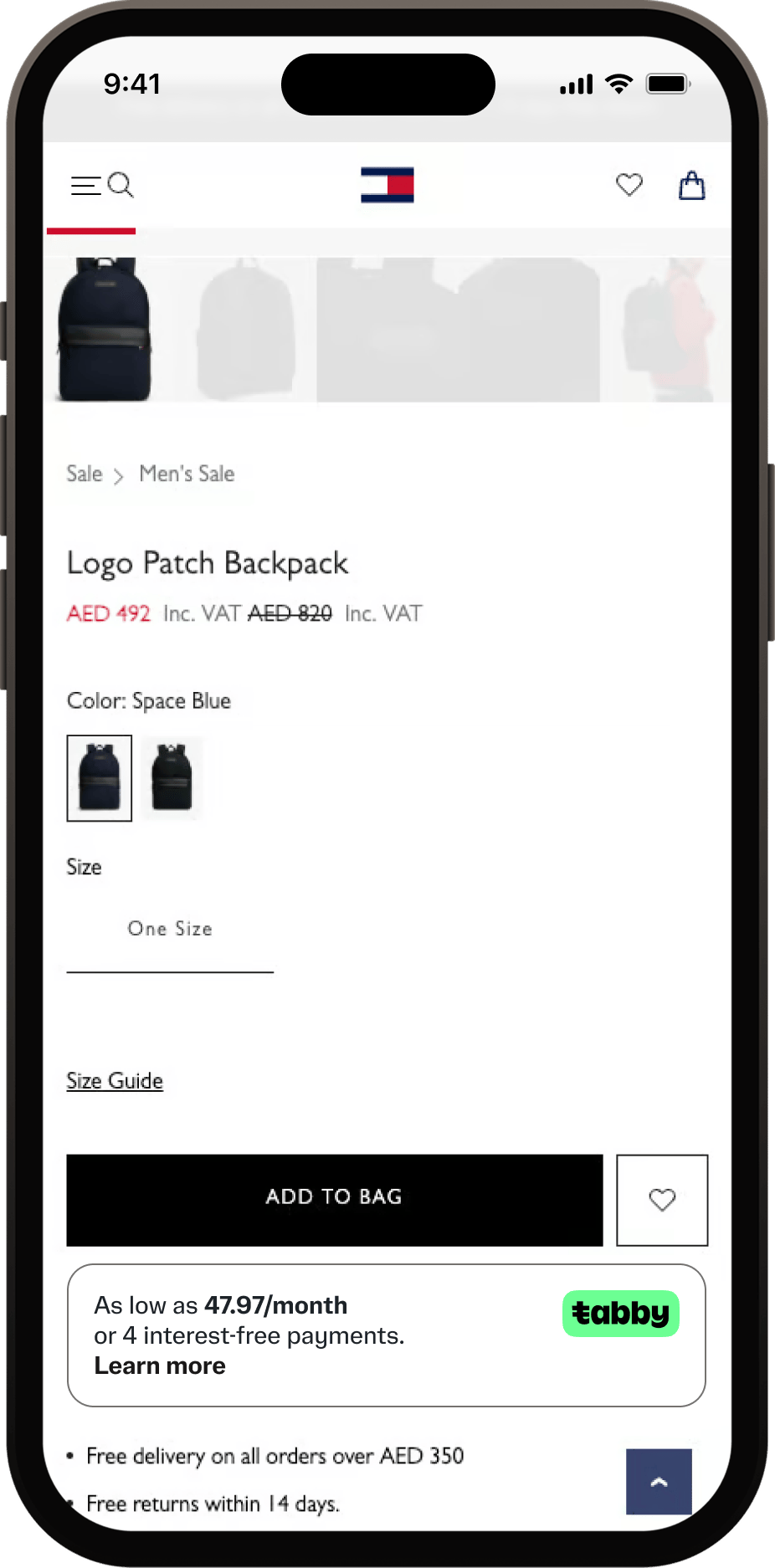
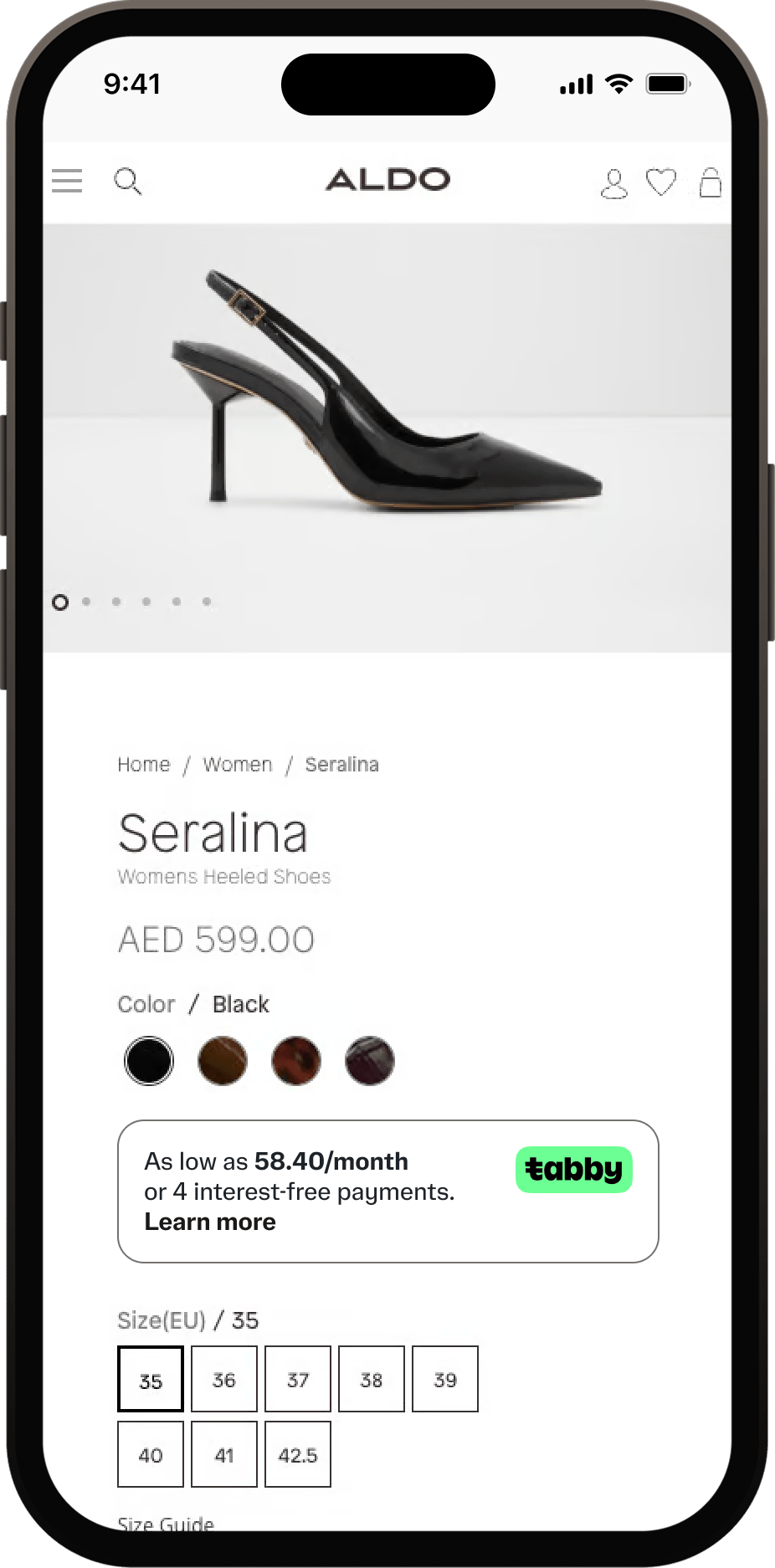
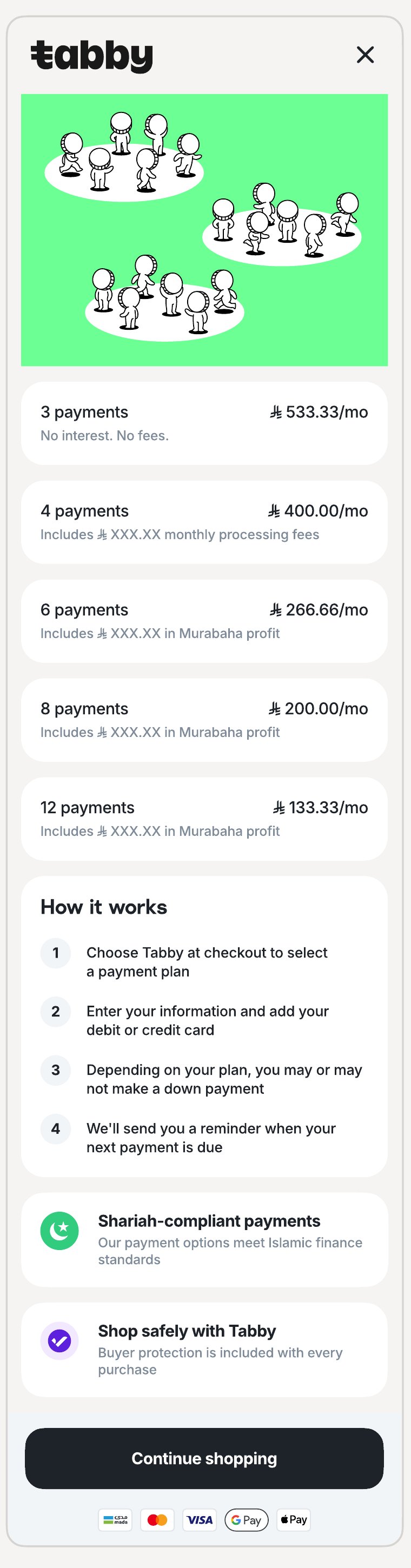
Tabby provides JavaScript snippets that display promotional messaging on your Product, Cart and Checkout pages. These snippets show split price information and a "Learn More" widget that opens a pop-up when clicked.

## Overview

Tabby promotional snippets help increase customer awareness and conversion rates by displaying payment options directly on your store pages. The implementation includes:

* **Product and Cart page snippet** - shows split payment options on product pages and the shopping cart page
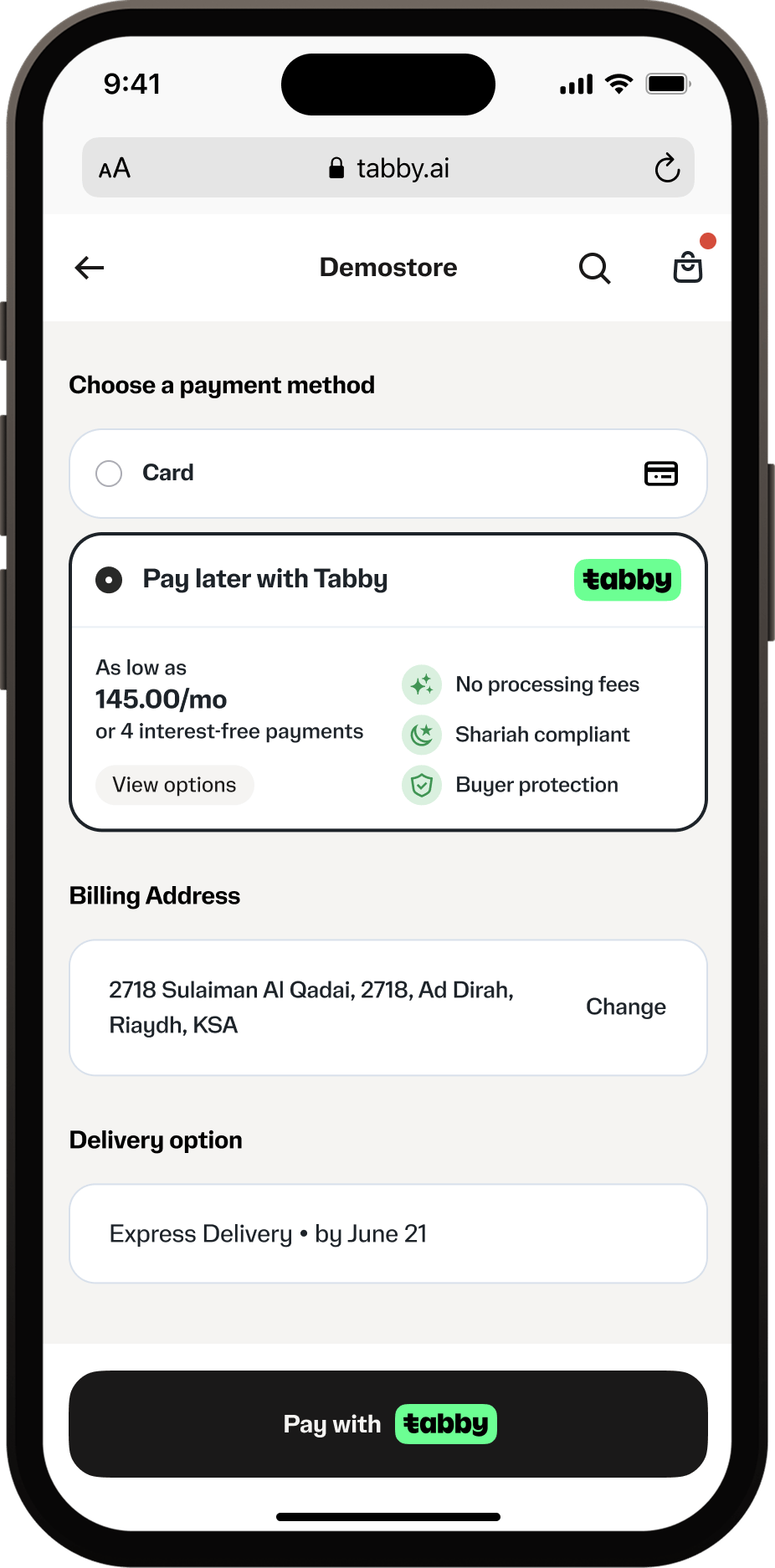
* **Checkout snippet** - provides payment details during checkout

<div style={{ display: "flex", flexWrap: "wrap", gap: "1rem", justifyContent: "center", alignItems: "flex-start" }}>
  <img className="product-shot" alt="Product page snippet" src="https://mintcdn.com/tabby-5f40add6/MNU7VcFJsgE-sYyU/images/pdp-snippet-th.png?fit=max&auto=format&n=MNU7VcFJsgE-sYyU&q=85&s=54412cade7003d33dc170e3e000fbe38" width="200" data-path="images/pdp-snippet-th.png" />

  <img className="product-shot" alt="Product page snippet" src="https://mintcdn.com/tabby-5f40add6/MNU7VcFJsgE-sYyU/images/pdp-snippet-aldo.png?fit=max&auto=format&n=MNU7VcFJsgE-sYyU&q=85&s=119b4ecc2e7b198bf629010e5be5a20b" width="200" data-path="images/pdp-snippet-aldo.png" />

  <img className="product-shot" alt="Checkout page snippet" src="https://mintcdn.com/tabby-5f40add6/iK1YsG45ORNrhJBb/images/checkout-snippet-0626.png?fit=max&auto=format&n=iK1YsG45ORNrhJBb&q=85&s=07d7ea5f1fefcb041986993eecdb8f78" width="200" data-path="images/checkout-snippet-0626.png" />
</div>

<Note>
  Ensure snippets fit mobile screen widths and are appropriately sized for desktop. All promo snippets and pop-up widgets must fit within screen dimensions.
</Note>

## Product and Cart Page Snippet

The Product and Cart page snippet uses the `TabbyPromo` component to display promotional messaging on product and cart pages.

Create an empty `<div>` element with a unique selector, preferably using an `id`:

```HTML theme={"dark"}
<div id="TabbyPromo"></div>
```

For maximum visibility, place the container in one of the suggested places:

* **Product**: near the product price or next to the "Add to cart" button;
* **Cart**: below the total cart amount.

Include the Tabby Promo script in your page and initialize the `TabbyPromo` component after the script loads:

```HTML theme={"dark"}
<script src="https://checkout.tabby.ai/tabby-promo.js"></script>
<script>
  new TabbyPromo({
    selector: '#TabbyPromo', // required
    currency: 'AED', // required, 'AED' or 'SAR' or 'KWD', uppercase, no spaces
    price: '1200.00', // required, 2 decimal places for AED, SAR; 3 decimal places for KWD
    lang: 'en', // optional, 'en' or 'ar'
    source: 'product', // optional, 'product' or 'cart'
    shouldInheritBg: false, // optional, true or false
    publicKey: 'your_pk', // required, Your public key
    merchantCode: 'your_merchant_code' // required, Your merchant code, based on your store currency
  });
</script>
```

If the white background of the snippet does not match your website design and you want the snippet to inherit the background color, you can use `shouldInheritBg: true`. When this parameter is set for `true`, you can also customize the text and link colors using the following CSS variables:

```CSS theme={"dark"}
    --snippetTextColor: white;
    --snippetLinkTextColor: white;
```

### Complete Product and Cart Snippet Example

```HTML theme={"dark"}
<html>
  <body>
    <div id="TabbyPromo"></div>
    <script src="https://checkout.tabby.ai/tabby-promo.js"></script>
    <script>
      new TabbyPromo({
        selector: '#TabbyPromo',
        currency: 'AED',
        price: '1200.00',
        lang: 'en',
        source: 'product',
        shouldInheritBg: false,
        publicKey: 'your_pk',
        merchantCode: 'your_merchant_code'
      });
    </script>
  </body>
</html>
```

## Checkout Snippet

The checkout snippet uses the `TabbyCard` component to display payment information during checkout. This is the recommended way to present Tabby payment details at your checkout — see <a href="/pay-in-4-custom-integration/checkout-flow#tabby-on-checkout">Tabby on Checkout</a>.

Create an empty `div` element where the Tabby Card will be displayed:

```HTML theme={"dark"}
<div id="tabbyCard"></div>
```

Place this div under the Tabby payment method option. Display it when the Tabby payment method is selected.

Load and Initialize TabbyCard:

```HTML theme={"dark"}
<script src="https://checkout.tabby.ai/tabby-card.js"></script>
<script>
  new TabbyCard({
    selector: '#tabbyCard', // required
    currency: 'SAR', // required, 'AED' or 'SAR' or 'KWD', uppercase, no spaces
    price: '1600.00', // required, 2 decimal places for AED, SAR; 3 decimal places for KWD
    lang: 'en', // optional, 'en' or 'ar'
    shouldInheritBg: false, // optional, true or false
    publicKey: 'your_pk', // required, Your public key
    merchantCode: 'your_merchant_code' // required, Your merchant code, based on your store currency
  });
</script>
```

### Complete Checkout Snippet Example

```HTML theme={"dark"}
<div id="tabbyCard"></div>
<html>
  <body>
    <div id="tabby"></div>
    <script src="https://checkout.tabby.ai/tabby-card.js"></script>
    <script>
      new TabbyCard({
        selector: '#tabbyCard',
        currency: 'SAR',
        price: '1600.00',
        lang: 'en',
        shouldInheritBg: false,
        publicKey: 'your_pk',
        merchantCode: 'your_merchant_code'
      });
    </script>
  </body>
</html>
```

## Custom Promo Snippets

If you can't use Tabby's JavaScript promo components (e.g., due to framework constraints, security policies, or custom requirements), you can use Tabby's "Learn More" pop-up widgets via direct URLs.

<Warning>
  Before implementing custom promo snippets, you must discuss and confirm the desired solution with your Tabby account manager.
</Warning>

### When to use custom promo snippets?

Consider custom promo snippets when:

* You can't load external JavaScript files due to security policies
* You're building a native mobile app and need webview integration - [check our Mobile App Promo Messaging guide](https://docs.tabby.ai/pay-in-4-custom-integration/mobile-apps/app-promo-messaging)
* You need complete control over snippet styling and behaviour

### Pop-up URL structure and examples

The pop-up URL follows this pattern:

| Description         | URL                                                                                                                                                                                                                                                                     |
| ------------------- | ----------------------------------------------------------------------------------------------------------------------------------------------------------------------------------------------------------------------------------------------------------------------- |
| UAE Pop-up, English | [**https://checkout.tabby.ai/promos/product-page/installments/en/?price=340.00\&currency=AED\&merchant\_code=AE\&public\_key=pk\_xyz**](https://checkout.tabby.ai/promos/product-page/installments/en/?price=340.00\&currency=AED\&merchant_code=AE\&public_key=pk_...) |
| KSA Pop-up, Arabic  | [**https://checkout.tabby.sa/promos/product-page/installments/ar/?price=100\&currency=SAR\&merchant\_code=SA\&public\_key=pk\_xyz**](https://checkout.tabby.sa/promos/product-page/installments/ar/?price=100\&currency=SAR\&merchant_code=SA\&public_key=pk_...)       |

#### URL Parameters

| Parameter       | Required | Description           | Values                                                      |
| --------------- | -------- | --------------------- | ----------------------------------------------------------- |
| `merchant_code` | Yes      | Your merchant code    | Provided by Tabby                                           |
| `public_key`    | Yes      | Your Tabby public key | `'pk_test_...'`, `'pk_...'`                                 |
| `price`         | Yes      | Product or cart price | `'1200.00'`, `'99.99'`, `'5.500'` (3 decimals for KWD only) |
| `currency`      | Yes      | Currency code         | `AED`, `SAR`, `KWD`                                         |
| `lang`          | No       | Language code         | `en`, `ar`                                                  |

<div style={{ display: "flex", flexWrap: "wrap", gap: "1rem", justifyContent: "center", alignItems: "flex-start" }}>
  <img className="product-shot" alt="UAE pop-up with price, en" src="https://mintcdn.com/tabby-5f40add6/P693KbtvGHftcJLw/images/custom-uae-en-0625.JPG?fit=max&auto=format&n=P693KbtvGHftcJLw&q=85&s=4705d8f2eacfe6bd9b9a996302fb3d8e" width="200" data-path="images/custom-uae-en-0625.JPG" />

  <img className="product-shot" alt="KSA pop-up with price, en" src="https://mintcdn.com/tabby-5f40add6/iK1YsG45ORNrhJBb/images/custom-ksa-en-0626.png?fit=max&auto=format&n=iK1YsG45ORNrhJBb&q=85&s=73803f1c4e0404d45b45838e74bddb9c" width="200" data-path="images/custom-ksa-en-0626.png" />
</div>

## Best Practices

### Security and Performance

* Never expose your Secret API Key in frontend code - only Public Key should be used there;
* Make sure snippet update is triggered when prices change on product pages with variant selectors;
* Consider lazy loading snippets for below-the-fold content;
* Use event listeners to detect when scripts load before initializing components.

### Responsive Design

* Ensure snippets fit mobile screen widths (typically 320px minimum);
* Verify snippet visibility across different screen sizes;
* Use CSS media queries for custom styling.